Unlock Your Digital Kingdom: Why Home Media Server Software is a Must-Have
Imagine having your entire collection of movies, TV shows, music, and cherished family photos instantly accessible from any device, anywhere in your home, or even when you're on the go. This isn't a futuristic dream; it's the reality offered by robust home media server software. In an era where digital content reigns supreme, the days of hunting for physical discs or transferring files via USB are rapidly becoming a distant memory. Instead, we've embraced virtual storage and networked access, transforming how we consume entertainment.
For anyone who has carefully curated a massive digital library—be it ripped DVDs, downloaded series, or personal videos—a dedicated media server solution is no longer a luxury but a necessity. It centralizes your multimedia, organizing it beautifully and making it effortlessly streamable to your Smart TV, smartphone, tablet, game console, or computer. With an ever-growing array of choices, selecting the best home media server software can seem daunting. This comprehensive guide will demystify the process, highlight essential features, and provide practical tips to help you manage and stream your digital universe freely.
What Exactly is Home Media Server Software?
At its core, home media server software is an application that transforms a conventional computer (like an old desktop, a mini PC, or even a dedicated Network Attached Storage - NAS device) into a powerful multimedia hub. This software acts as the brain, cataloging your entire collection of audio, video, and picture files, then serving them up to various "client" devices connected to your home network, or securely over the internet. Think of it as your personal, highly organized streaming service, entirely under your control.
The beauty of this setup lies in its ability to transcend device limitations. Instead of storing a movie on your laptop and another on your tablet, the media server holds everything. When you want to watch something, your chosen client device (e.g., your TV's app, a web browser, or a mobile app) connects to the server. The software then efficiently delivers the content, often adjusting the file's format or resolution on-the-fly to ensure seamless playback on that specific device and network condition. This secure connection and robust network architecture are what make it possible to share videos with relatives, post pictures taken with your camera, and even have your media automatically synced to mobile devices.
Key Features to Look for in Home Media Server Software
Choosing the right home media server software involves more than just picking the first option you find. Several critical factors influence its performance, usability, and your overall streaming experience. Keep these in mind as you explore your options:
Streaming Quality & Transcoding Capabilities
One of the most crucial aspects is the software's ability to deliver high-quality video and audio without buffering or stuttering. This often comes down to its transcoding capabilities. Transcoding is the process of converting a media file from one format or bitrate to another. For instance, if you have a high-bitrate 4K movie and you're trying to stream it to an older tablet over Wi-Fi, the server might transcode it down to 1080p or 720p to ensure smooth playback without overwhelming the device or network. Superior software offers efficient, real-time transcoding that adapts to your network speed and client device specifications, ensuring you can Unlock Your Digital Library: Stream Movies & TV Anywhere, regardless of the source file.
Device & OS Compatibility
What good is a media server if you can't access it from your preferred devices? The best solutions offer broad compatibility across a range of operating systems and client devices. Look for software that supports:
- Smart TVs: Samsung, LG, Sony, Vizio, etc.
- Mobile Devices: Android phones/tablets, Apple iPhones/iPads.
- Streaming Devices: Roku, Apple TV, Amazon Fire TV, Chromecast.
- Gaming Consoles: PlayStation, Xbox.
- Computers: Windows, macOS, Linux (for both server and client applications).
The server software itself should also be compatible with your chosen server hardware's operating system (Windows, Linux, macOS, or a NAS OS). For a deeper dive into matching software with your ecosystem, consider reading more on Choosing Media Server Software: Compatibility & Streaming Quality.
Media Organization & Library Management
A disorganized library is frustrating. Excellent home media server software excels at automatically organizing your content. This includes:
- Automatic Metadata Fetching: Pulling in movie posters, TV show synopses, cast information, album art, and song lyrics.
- Categorization: Neatly separating movies, TV shows (by season/episode), music, and photos.
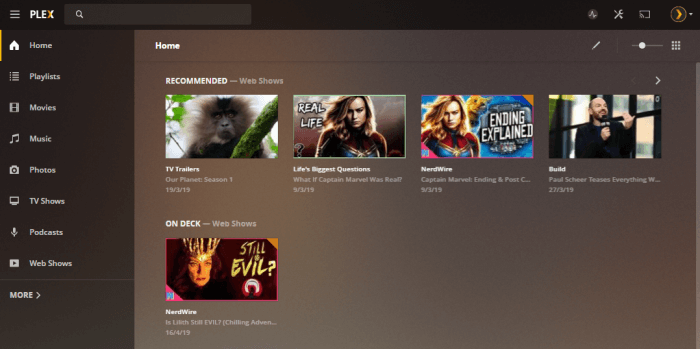
- User-Friendly Interface: An intuitive, visually appealing interface that makes browsing your collection a joy.
- Customization: The ability to manually edit metadata, create custom collections, or manage user profiles.
Live TV & DVR Capabilities
For those looking to cut the cord or enhance their traditional TV experience, some media server software offers integrated Live TV and DVR (Digital Video Recorder) functionality. This means you can:
- Connect a compatible TV tuner to your server.
- Watch live broadcasts from local channels or cable providers directly through your media server interface.
- Schedule and record live TV shows, much like a traditional DVR.
- Access an Electronic Program Guide (EPG) to browse upcoming shows.
This feature transforms your media server into a comprehensive entertainment hub, allowing you to view videos uninterruptedly on your mobile device and TV.
Remote Access & Security
The ability to access your media from "virtually anywhere" is a cornerstone of a great media server. This necessitates robust remote access features and, crucially, strong security. Look for software that offers:
- Secure Remote Streaming: Encrypted connections to protect your data when accessing your server outside your home network.
- User Authentication: Login credentials to restrict access to authorized users.
- Network Security: Built-in firewalls or guidance on how to secure your network to prevent unauthorized intrusion, as your data sets are protected using a series of firewalls.
Setting Up Your Home Media Server: Practical Tips
Beyond selecting the software, a successful home media server setup requires attention to hardware and network configuration.
Choose Your Hardware Wisely
Your server hardware forms the backbone of your digital library. Options include:
- Dedicated Computer: An old desktop or a mini PC can be repurposed. Ensure it has enough processing power (especially if heavy transcoding is required) and ample storage capacity for your growing media collection.
- Network Attached Storage (NAS): A NAS device is specifically designed for file storage and sharing. Many come with built-in apps or support for popular media server software, offering a low-power, always-on solution. Consider models with powerful CPUs for better transcoding performance.
Remember that the server will be running continuously, so energy efficiency and quiet operation are often desirable.
Network Considerations
A robust home network is vital for smooth streaming, particularly for high-resolution content or multiple simultaneous streams:
- Wired Connections: For your server and any primary streaming devices (like your Smart TV), an Ethernet connection is always superior to Wi-Fi for stability and speed.
- Router Performance: Invest in a good quality router that can handle high bandwidth, especially if you plan on streaming 4K content or accessing your server remotely. Wi-Fi 5 (802.11ac) or Wi-Fi 6 (802.11ax) are recommended for client devices.
- Remote Access Configuration: Setting up remote access typically involves configuring port forwarding on your router. While some software automates this with UPnP, understanding basic network settings can be beneficial.
Organize Your Media Files
Before you even install the software, take the time to organize your media files on your server. Consistent naming conventions and a logical folder structure will make it far easier for the media server software to correctly identify and categorize your content. For example, movies in a "Movies" folder, TV shows in "TV Shows" with subfolders for each series and season (e.g., "TV Shows/Series Name/Season 01/"). This small effort upfront will save you countless hours of manual metadata correction later.
Finding the Best Home Media Server Software for You
Ultimately, the "best" home media server software is subjective and depends entirely on your specific needs, technical comfort level, and budget. Some users prioritize ease of use and a polished interface, while others demand maximum customization and open-source flexibility. Some solutions are free, while others offer premium features through subscriptions.
Consider your primary use cases: Are you mainly streaming within your home network, or is remote access a priority? Do you need live TV and DVR functionality? How extensive is your media library, and what types of files does it contain? By carefully evaluating these factors against the features discussed, you can make an informed decision. Many popular solutions offer free tiers or trials, allowing you to test them out before committing fully.
Conclusion
Embracing home media server software is a transformative step for any digital media enthusiast. It liberates your content from isolated hard drives, offering unparalleled access, organization, and streaming freedom. From blasting your multimedia content to various devices through the use of a NAS or computer, to automatically syncing your media to mobile devices, the benefits are clear. By considering streaming quality, recording capabilities, compatibility, and robust organization, you can select a solution that perfectly fits your digital lifestyle. Take control of your entertainment and build the ultimate personalized streaming experience today.